


Table of Contents

Win more bids. Close more jobs. Start with our newsletter.
Get exclusive insights, tips, and trends your competition doesn't want you to know.

Key takeaways
- Different tools solve different problems. Color visualizers help customers decide. Product apps handle materials and manuals. Community apps support learning. CRM software runs the entire business.
- Single-purpose apps create gaps. Juggling five apps for color previews, estimates, scheduling, and invoicing costs painting contractors hours of duplicate work every week.
- Fit matters more than feature count. The best paint contractor software is the one that matches how the crew already works and can grow with the business.
- All-in-one platforms like JobNimbus pull leads, jobs, crews, customer communication, and invoicing into a single system so nothing falls through the cracks.
A quick tour of what paint contractor software can actually do
Running a painting business means managing leads, estimates, crew schedules, customer follow-ups, photos, and invoicing, often on the same day. Paint contractor software promises to make that easier, but the market is crowded with tools that each solve one slice of the problem. Color visualizers. Paint calculators. Equipment apps. Community forums. CRM platforms.
The industry behind all of this is sizable. According to the American Coatings Association, the U.S. paint and coatings industry employs 312,000 workers across roughly 53,400 establishments, supported by $19.9 billion in annual payroll. Most of those establishments are small painting businesses where a single lost lead or a missed job detail can sink a whole week.
Most painting contractors start with a free app or two for product reference or color selection. That works fine for one or two jobs. As volume grows and the crew expands, those scattered tools start costing time instead of saving it. This guide walks through the main categories of software for painting contractors, from simple apps for color decisions to full business management systems. The goal is to help spot where a current setup is leaking time and where a more connected system would pay for itself.
Use color visualization apps to speed up customer decisions and close jobs faster
Color decisions can stall a job before the first drop cloth comes out. Homeowners often cannot picture the finished look, so they hesitate, second-guess, and pull a contractor into three extra conversations about Agreeable Gray versus Repose Gray. Visualization apps cut through the hesitation by letting customers see the color on their own walls before any committment.
That is more than a design perk. A good painting app turns abstract choices into a visual customers can react to, which shortens the approval cycle and clears up expectations. The sooner the color is locked in, the sooner the deposit clears and the crew can schedule the job.
Color visualization apps for painting contractors generally help with four things:
- Narrowing choices faster by showing options on real photos instead of a swatch
- Reducing miscommunication about the final look before paint hits the wall
- Improving the early sales experience with a more professional, interactive pitch
- Giving brand flexibility through manufacturer-neutral apps that stay independent of one product line
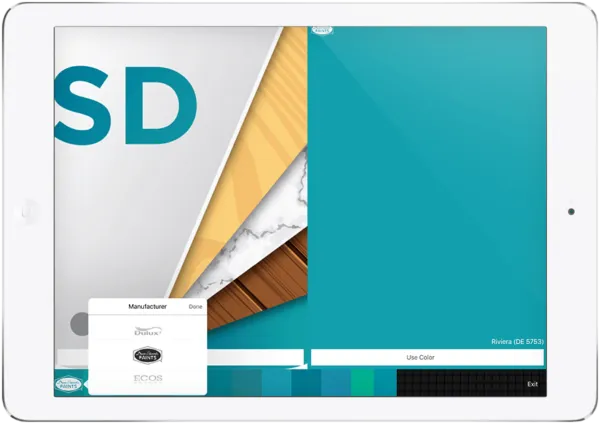
Paint and Finishes Project Organizer (iOS, Android)
Think of this painting app as a digital swatch book with built-in organization. It does the expected job of applying colors to project photos, but it also lets you group options by room, label decisions, and attach notes to each selection. That matters on real jobs where three bedrooms, a hallway, and a kitchen each have different finishes and a decision-maker who keeps changing their mind.
Most interior and exterior projects involve more than one surface and more than one opinion. Having every option tagged and sorted keeps conversations on track and prevents the "wait, did we pick the warmer beige or the cooler one?" moment three weeks into the job.
Paint My Place (iOS)
Paint My Place is built for quick before-and-after visuals using real photos from a phone or tablet. It works for more than interior walls. The app applies color to exteriors, roofs, or fences, which makes it useful across a wider range of painting projects.
Saved schemes and simple sharing help follow-up conversations move along. When a customer can open an email, see three options discussed on-site, and forward them to a spouse for a second opinion, the approval happens faster. Fewer repeat visits. Fewer drawn-out text threads.
Paint Tester (iOS, Android)
Paint Tester adds a more interactive visual experience. The app applies color in a way that feels dynamic, almost like watching the paint go on. That sense of motion helps customers connect with the result and talk more concretely about what they want.
The editing controls are where it earns its keep. Brush and fill tools target specific sections instead of flooding the entire image. Brightness controls help match real lighting, which is useful for showing how a sample will look at sunset versus under morning light. Previews can be shared through email or social channels, so decisions keep moving even after the contractor leaves the driveway.
Painting product apps built for contractors in the field
Product apps shift the focus from the customer side to the contractor side. Most major paint manufacturers offer an app that covers material estimating, product specs, sprayer manuals, and compatibility details. These tools are not flashy, but they answer the question every painter has asked from a ladder: how many gallons do I actually need?
Product apps fit naturally into an existing workflow when the crew already stocks a certain brand. Quick access to accurate product information saves phone calls to the local supplier and reduces costly reorder mistakes.
The honest caveat is that these apps are reference tools, not business tools. They do not track leads, schedule crews, or handle customer communication. They plug one gap but leave the rest of the business to spreadsheets, group texts, and memory.
Connector app for Titan
The Connector app supports contractors who run Titan sprayers and want fast access to compatibility charts, manuals, and equipment information. It lives on the phone that is already in your pocket, which beats digging through a glovebox or printed binder when a sprayer stops behaving mid-job.
The app also surfaces current promotions and sales tools, so there is some upside beyond reference. It is a convenience app, and for a busy painting crew, that is enough to earn a spot on the home screen.
Paint Calculator for Sherwin-Williams (iOS, Android)
A paint calculator is one of those quiet productivity wins. Enter room dimensions, surface type, and finish, and the app returns a material estimate worth more than a gut guess. Fewer under-orders. Less wasted product. Smoother prep days.
That is the scope, though. A material calculator does not account for labor hours, crew scheduling, or project profitability. It is a handy tool inside a bigger stack, not a replacement for an estimating system that handles the full job cost. For pricing the whole job correctly, see how to bid a paint job.
Use community apps to learn faster and solve real-world problems
Painting is a trade, and trades are learned partly from manuals and partly from the painter who figured out the same weird callback three years ago. Community apps give contractors a place to ask questions, share lessons, and stay plugged into what other painters are doing.
Communities will not run the business. They will, however, help avoid mistakes that cost real money. A single good answer about prep on a chalky exterior or the right tip size for a cabinet refinish can pay back the download ten times over.
PaintTalk (Android)
PaintTalk connects painters in an ongoing online community. Contractors post questions, answer others, and see how painters in different markets handle common job challenges. The app is Android-only at the time of writing, which is a limitation, but the value is in the conversations rather than the interface.
Helping other painters also builds a professional network. That matters when an overflow week needs a subcontractor, when an insurance carrier referral comes up, or when a commercial bid needs a sanity check. Just know the line: this is a learning and networking tool, not an operations platform.
CRM and project management software for painting contractors
After the visualization apps, the product tools, and the forum bookmarks, there is still the actual business to run. CRM and project management software for painting contractors brings the scattered pieces into one place: leads, estimates, schedules, job notes, photos, invoices, and customer conversations.
The pitch is straightforward. When everything lives on one platform, the office and the crew work from the same information. There is no copy-pasting between a quoting tool and a calendar app. No lost text threads. No estimator wondering which color the customer actually approved.
That becomes more than a convenience as the business grows. According to the U.S. Bureau of Labor Statistics, median pay for construction painters reached $48,660 in May 2024, and employment is projected to grow 4 percent through 2034. Rising labor costs mean every hour a crew spends chasing down paperwork is an hour the business is paying for twice. Closing more of those jobs in the first place starts with a sharper sales process, so see this guide on how to sell painting jobs for the fundamentals.
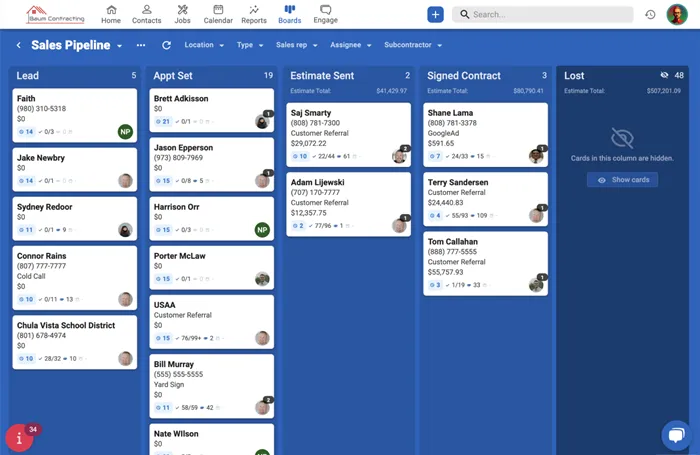
An all-in-one option for growing painting businesses
JobNimbus is built for contractors who are done stitching together apps. It keeps leads, jobs, crew assignments, customer communication, photos, estimates, and invoices in a single workspace that works on both desktop and mobile. Field crews update jobs from their trucks. Office staff see those updates in real time.
What that solves day to day:
- One source of truth for customer information so every team member sees the same notes, addresses, and job history
- Real-time communication between the office and the field without chasing people through texts, emails, and voicemails
- Fewer tools to log into because estimates, scheduling, photos, and invoicing live in the same platform
- A clearer workflow from first call to final payment that stops jobs from stalling in the handoff between sales and production
The organization and time-savings gains are not hypothetical. Ninety-five percent of JobNimbus customers report their business is better organized since switching, nine out of ten report improved team communication, and teams save an average of six to ten hours per person per week, based on JobNimbus customer survey data.
Software works best when the pipeline feeding it is full. Painting contractors who pair a strong CRM with the 4 key steps to marketing a painting business tend to see the biggest jump in booked jobs, because organized follow-up beats scattered hustle almost every time.
When simple painting apps are no longer enough
Individual apps are a fine starting point. A color visualizer here, a paint calculator there, maybe a spreadsheet for scheduling. The trouble starts when volume grows and those tools stop talking to each other. Common signs the cracks are forming:
- Too many disconnected apps or manual processes that require re-entering the same customer information in five places
- Missed handoffs between the person who sold the job and the crew that shows up to paint it
- Progress tracking becomes guesswork because jobs live in different apps, inboxes, and group chats
- No central home for notes, files, and updates, which leads to a lot of "can you re-send that photo?" conversations
- Customer follow-up falls off because no system flags the estimates sitting quietly in limbo
Somewhere between two and ten active jobs, most painting businesses hit a point where an all-in-one platform saves more time than it takes to set up. That is the tipping point worth watching for.
How to choose the right paint contractor software for your business
Picking the best software for painting contractors is less about feature lists and more about how the crew actually works. A solo painter handling two residential jobs a week has different needs than a ten-person commercial operation juggling fifteen active projects.
A few honest questions to ask before comparing products:
- What is the biggest pain right now? If it is color selection, start with a visualization app. If missed follow-ups and scheduling chaos top the list, a CRM is the better fix.
- How many people need access? Solo contractors can survive on simple tools. Teams need shared visibility, permissions, and mobile access.
- Is growth in the plan? Software that fits a three-person crew may not scale to ten. Choosing a platform that can grow avoids switching costs later.
- How much happens in the field? When crews are on ladders all day, mobile-first software is not optional.
- What integrates with what is already in use? Accounting, payment processing, and estimating tools should talk to the CRM, not sit in isolation.
Here is how single-purpose painting apps stack up against all-in-one paint contractor software at a glance:
If the painting business is brand new, how to start a painting business covers the foundational decisions before software ever enters the picture.
The bottom line on painting software that fits how you work
Different tools solve different problems. Color apps help customers make decisions. Product apps support materials and planning. Community apps help contractors learn and connect. CRM software manages the whole business from the first call to the last invoice. The right mix depends on where the business is and where it is headed.
For solo painters and brand-new shops, a couple of free apps are a reasonable place to start. For growing painting businesses with multiple crews, active pipelines, and more jobs than memory can track, an all-in-one platform like JobNimbus takes the weight off the back office and keeps the field team aligned. Less chaos. More finished jobs. More happy customers.
Ready to stop switching between five apps to run a single job? See how JobNimbus works for painting contractors and start a free trial.

Frequently Asked Questions
The best apps depend on what problem the contractor is solving. For color selection, try Paint My Place, Paint Tester, or manufacturer visualizers. For product reference and estimating materials, use apps like the Sherwin-Williams Paint Calculator or the Titan Connector app. For running the whole business, CRM platforms like JobNimbus handle leads, jobs, scheduling, and invoicing in one place.
Look for lead and contact management, estimating and quoting, scheduling, photo documentation, job notes, mobile access for field crews, invoicing, and integrations with accounting or payment tools. Automations for follow-ups and review requests are a strong bonus.
Start with the biggest operational headache. If it is color approvals, a visualization app solves it. If it is missed follow-ups, duplicate data entry, or crew coordination, a CRM designed for contractors is the better answer. Match the tool to team size, growth plan, and field workflow.
Yes, but with limits. A paint calculator app estimates material amounts based on project dimensions, which is useful for reducing waste and avoiding reorders. It does not estimate labor hours, crew costs, or total project price, so it is a supporting tool rather than a full estimating system.
Solo contractors with a handful of jobs can usually get by without one. Painting businesses with multiple crews, active pipelines, and regular follow-ups benefit from a CRM because it prevents leads from slipping, keeps communication centralized, and makes the team easier to manage as the business grows.

Blog / Guide Title CTA
Once you've created a strong Linkedin profile, you can leverage it as part of your broader marketing strategy. Use your Linkedin to share content, join industry groups, and network with others in the contracting space.
If you're looking for additional marketing support, consider partnering with JobNimbus Marketing to maximize your business growth. Schedule a call with our team to learn how to boost your marketing efforts today.
Blog / Guide Title CTA
Once you've created a strong Linkedin profile, you can leverage it as part of your broader marketing strategy. Use your Linkedin to share content, join industry groups, and network with others in the contracting space.
If you're looking for additional marketing support, consider partnering with JobNimbus Marketing to maximize your business growth. Schedule a call with our team to learn how to boost your marketing efforts today.
Download Our Free Tips for Recession-Proofing Your Company
We’ll show you five simple things you can do to help your business survive a recession.